

Download this example
Download this example as a Jupyter Notebook or as a Python script. All assets used in the examples can be downloaded as a ZIP archive.
How to open result#
This tutorial demonstrates how to open and review results using workflow method.
Prerequisites#
Perform imports#
[1]:
import os
from pathlib import Path

from ansys.speos.core import Project, Speos, launcher
from ansys.speos.core.generic.version_checker import server_version_checker
from ansys.speos.core.kernel.client import (
    default_docker_channel,
)
from ansys.speos.core.simulation import SimulationDirect
Define constants#
Constants help ensure consistency and avoid repetition throughout the example.
[2]:
HOSTNAME = "localhost"
GRPC_PORT = 50098  # Be sure the Speos GRPC Server has been started on this port.
FILE_NAME = "LG_50M_Colorimetric_short.sv5"
RESULT_NAME = "ASSEMBLY1.DS (0).Dom Irradiance Sensor (0).xmp"
USE_DOCKER = True  # Set to False if you're running this example locally as a Notebook.
USE_GPU = False
Model Setup#
Load assets#
The assets used to run this example are available in the PySpeos repository on GitHub.
Note: Make sure you have downloaded simulation assets and set
assets_data_pathto point to the assets folder.
[3]:
if USE_DOCKER:  # Running on the remote server.
    assets_data_path = Path("/app") / "assets"
else:
    assets_data_path = Path("/path/to/your/download/assets/directory")
Connect to the RPC Server#
This Python client connects to a server where the Speos engine is running as a service. In this example, the server and client are the same machine.
[4]:
if USE_DOCKER:
    speos = Speos(channel=default_docker_channel())
else:
    speos = launcher.launch_local_speos_rpc_server(port=GRPC_PORT)
/home/runner/work/pyspeos/pyspeos/.venv/lib/python3.14/site-packages/ansys/tools/common/cyberchannel.py:201: UserWarning: Starting gRPC client without TLS on localhost:50098. This is INSECURE. Consider using a secure connection.
  warn(f"Starting gRPC client without TLS on {target}. This is INSECURE. Consider using a secure connection.")
Create project from a Speos file#
The Project class is instantiated by passing a Speos instance and the name of the Speos project file.
[5]:
p = Project(
    speos=speos,
    path=str(assets_data_path / FILE_NAME / FILE_NAME),
)
print(p)
{
"name": "LG_50M_Colorimetric_short",
"description": "From Speos file: /app/assets/LG_50M_Colorimetric_short.sv5/LG_50M_Colorimetric_short.sv5",
"part_guid": "dd6c4a17-6815-444a-9ed7-8be46152be3e",
"sources": [
{
"name": "Dom Source 2 (0) in SOURCE2",
"metadata": {
"UniqueId": "e1bf4655-a820-4226-be1f-9c3f1f308c54"
},
"source_guid": "d7e198b8-f41c-4e79-a69b-e2707f49ff85",
"display_name": "",
"description": "",
"source": {
"name": "Dom Source 2 (0) in SOURCE2",
"surface": {
"radiant_flux": {
"radiant_value": 6.590041607465698
},
"intensity_guid": "aa8e5006-23c9-4fc4-996c-371a85c5a632",
"exitance_constant": {
"geo_paths": [
{
"geo_path": "Solid Body in SOURCE2:2920204960/Face in SOURCE2:222",
"reverse_normal": false
}
]
},
"spectrum_guid": "964901ff-c3da-4ce0-8372-f103641f497c",
"intensity": {
"cos": {
"N": 1.0,
"total_angle": 180.0
},
"name": "",
"description": "",
"metadata": {}
},
"spectrum": {
"library": {
"file_uri": "/app/assets/LG_50M_Colorimetric_short.sv5/Red Spectrum.spectrum"
},
"name": "",
"description": "",
"metadata": {}
}
},
"description": "",
"metadata": {}
}
},
{
"name": "Surface Source (0) in SOURCE1",
"metadata": {
"UniqueId": "95ee4b21-9241-4874-abf9-01a0f3f2f092"
},
"source_guid": "b5c1bdd6-7a22-4eac-b398-d257c48cb866",
"display_name": "",
"description": "",
"source": {
"name": "Surface Source (0) in SOURCE1",
"surface": {
"radiant_flux": {
"radiant_value": 9.290411220389682
},
"intensity_guid": "99c54afd-77b3-476a-a66b-940f76ef1b8f",
"exitance_constant": {
"geo_paths": [
{
"geo_path": "Solid Body in SOURCE1:2494956811/Face in SOURCE1:187",
"reverse_normal": false
}
]
},
"spectrum_guid": "9132e54c-9fdd-40c9-a9dc-2da6b032f643",
"intensity": {
"cos": {
"N": 1.0,
"total_angle": 180.0
},
"name": "",
"description": "",
"metadata": {}
},
"spectrum": {
"library": {
"file_uri": "/app/assets/LG_50M_Colorimetric_short.sv5/Blue Spectrum.spectrum"
},
"name": "",
"description": "",
"metadata": {}
}
},
"description": "",
"metadata": {}
}
}
],
"sensors": [
{
"name": "Dom Irradiance Sensor (0)",
"metadata": {
"UniqueId": "732ae780-2c65-4b51-9525-7b541b07826b"
},
"sensor_guid": "80e9ef0d-534d-470e-9701-459971458543",
"result_file_name": "ASSEMBLY1.DS (0).Dom Irradiance Sensor (0)",
"display_name": "",
"description": "",
"sensor": {
"irradiance_sensor_template": {
"sensor_type_colorimetric": {
"wavelengths_range": {
"w_start": 400.0,
"w_end": 700.0,
"w_sampling": 25
}
},
"illuminance_type_planar": {},
"dimensions": {
"x_start": -20.0,
"x_end": 20.0,
"x_sampling": 500,
"y_start": -20.0,
"y_end": 20.0,
"y_sampling": 500
},
"axis_system": [
-42.0,
2.0,
5.0,
0.0,
1.0,
0.0,
0.0,
0.0,
-1.0,
-1.0,
0.0,
0.0
],
"layer_type_source": {},
"integration_direction": [
1.0,
-0.0,
-0.0
],
"ray_file_type": "RayFileNone"
},
"name": "Dom Irradiance Sensor (0)",
"description": "",
"metadata": {}
}
}
],
"simulations": [
{
"name": "ASSEMBLY1.DS (0)",
"metadata": {
"UniqueId": "7ae93b7e-518d-47ba-bff0-5e6dfaeb26ee"
},
"simulation_guid": "e676f6a2-7160-4f48-87e6-26d41c998739",
"sensor_paths": [
"Dom Irradiance Sensor (0)"
],
"source_paths": [
"Dom Source 2 (0) in SOURCE2",
"Surface Source (0) in SOURCE1"
],
"geometries": {
"geo_paths": []
},
"display_name": "",
"description": "",
"source_groups": [],
"simulation": {
"direct_mc_simulation_template": {
"geom_distance_tolerance": 0.05,
"max_impact": 100,
"weight": {
"minimum_energy_percentage": 0.005
},
"dispersion": true,
"colorimetric_standard": "CIE_1931",
"fast_transmission_gathering": false,
"ambient_material_uri": ""
},
"name": "ASSEMBLY1.DS (0)",
"metadata": {},
"description": "",
"scene_guid": "d86f7a30-7c56-41de-b7f9-0b5e78ade0ab",
"simulation_path": "ASSEMBLY1.DS (0)",
"job_type": "CPU"
}
}
],
"materials": [
{
"name": "Material.1",
"metadata": {
"UniqueId": "58f1e73e-27e5-4d58-83c3-320db00cae2c"
},
"geometries": {
"geo_paths": [
"Solid Body in GUIDE:1379760262/Face in GUIDE:169"
]
},
"sop_guid": "09aefd91-0177-4315-8f7b-857d70003829",
"display_name": "",
"description": "",
"sop_guids": [],
"sop": {
"mirror": {
"reflectance": 100.0
},
"name": "",
"description": "",
"metadata": {}
}
},
{
"name": "Material.2",
"metadata": {
"UniqueId": "c3e26a41-c1ea-4dff-a6ea-5a6091554d41"
},
"vop_guid": "67168951-2527-4682-b073-333bb18f4446",
"geometries": {
"geo_paths": [
"Solid Body in GUIDE:1379760262"
]
},
"sop_guid": "b9001649-0218-442f-8006-c7bb4eb361be",
"display_name": "",
"description": "",
"sop_guids": [],
"vop": {
"optic": {
"index": 1.4,
"constringence": 60.0,
"absorption": 0.0
},
"name": "",
"description": "",
"metadata": {}
},
"sop": {
"optical_polished": {},
"name": "",
"description": "",
"metadata": {}
}
},
{
"name": "Material.3",
"metadata": {
"UniqueId": "cbb9386a-6ce7-4827-a727-e310b39de002"
},
"vop_guid": "926dee2c-9eed-4f22-914a-43e5e2f12717",
"geometries": {
"geo_paths": [
"Solid Body in SOURCE2:2920204960",
"Solid Body in SOURCE1:2494956811"
]
},
"sop_guid": "09aefd91-0177-4315-8f7b-857d70003829",
"display_name": "",
"description": "",
"sop_guids": [],
"vop": {
"opaque": {},
"name": "",
"description": "",
"metadata": {}
},
"sop": {
"mirror": {
"reflectance": 100.0
},
"name": "",
"description": "",
"metadata": {}
}
},
{
"name": "Material.4",
"metadata": {
"UniqueId": "0a0e981a-d5e2-4fb7-8c9a-dc975c7f55c1"
},
"vop_guid": "3f7991fc-efd6-4d7f-95a8-a07fe4a2149b",
"display_name": "",
"description": "",
"sop_guids": [],
"vop": {
"optic": {
"index": 1.0,
"absorption": 0.0
},
"name": "",
"description": "",
"metadata": {}
}
}
],
"metadata": {},
"sub_scene_anchor_axis_system": [],
"scenes": []
}
Retrieve the simulation feature#
Use the method Project.find() to retrieve an instance of the SimulationDirect feature.
[6]:
sim = p.find(name=".*", name_regex=True, feature_type=SimulationDirect)[0]
Run simulation#
The simulation can be run using either the CPU or with GPU acceleration. The following cell shows how Python is used to assign the appropriate method to run_sim.
[7]:
run_sim = sim.compute_GPU if USE_GPU else sim.compute_CPU
results = run_sim()  # run the simulation
print(results)
[upload_response {
  info {
    uri: "c629e501-27e0-486d-8252-93119ad9c02d"
    file_name: "ASSEMBLY1.DS (0).Dom Irradiance Sensor (0).xmp"
    file_size: 1800783
  }
}
, upload_response {
  info {
    uri: "5953a533-93b3-49e1-8c02-ea618b52ed6e"
    file_name: "ASSEMBLY1.DS (0).html"
    file_size: 250054
  }
}
]
Postprocessing#
Open the results:#
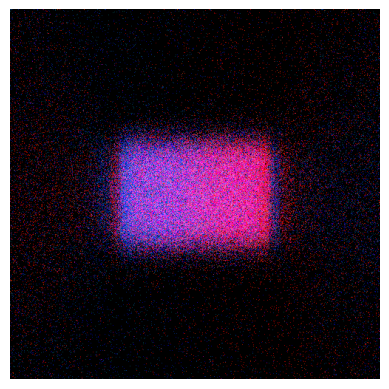
Display one result as image.
A full path can be given, or the name of the result.
[8]:
# Method available only on Windows OS or with Speos 2026 R1.2 or higher,
# which supports opening XMP results as images regardless of the OS.
if os.name == "nt" or server_version_checker.is_version_supported(2026, 1, 2):
    from ansys.speos.core.workflow.open_result import open_result_image

    open_result_image(simulation_feature=sim, result_name=RESULT_NAME)
Display the image#
Display one result in a result viewer.
A full path can be given, or the name of the result.
[9]:
if os.name == "nt":
    from ansys.speos.core.workflow.open_result import open_result_in_viewer

    open_result_in_viewer(
        simulation_feature=sim,
        result_name=RESULT_NAME,
    )
Export the XMP result to PNG image#
Export one result to a PNG image file.
A full path can be given, or the name of the result.
[10]:
from ansys.speos.core.workflow.open_result import export_xmp_to_image
[11]:
exported_image = export_xmp_to_image(simulation_feature=sim, result_name=RESULT_NAME)
if exported_image.HasField("path"):
    print(exported_image.path)  # Local path of the exported image on the server.
elif exported_image.HasField("upload_response"):
    print(
        exported_image.upload_response.info.uri
    )  # URI of the exported image on the server, which can be used to download the file.
ed697f69-113d-4416-ab39-6a76f8a3a5bf
[12]:
speos.close()
[12]:
True
Download this example
Download this example as a Jupyter Notebook or as a Python script. All assets used in the examples can be downloaded as a ZIP archive.