

Download this example
Download this example as a Jupyter Notebook or as a Python script. All assets used in the examples can be downloaded as a ZIP archive.
How to create a project#
This tutorial demonstrates how to create a project.
What is a project?#
A project is a speos simulation container that includes parts, material properties, sensor, sources and simulations.
In this tutorial you will learn how to create a project from scratch or from a pre-defined .speos file.
Prerequisites#
Perform imports#
[1]:
import os
from pathlib import Path

from ansys.speos.core import Project, Speos
from ansys.speos.core.generic.version_checker import server_version_checker
from ansys.speos.core.kernel.client import (
    default_docker_channel,
)
from ansys.speos.core.launcher import launch_local_speos_rpc_server
from ansys.speos.core.sensor import SensorIrradiance
from ansys.speos.core.simulation import SimulationDirect
from ansys.speos.core.source import SourceLuminaire, SourceSurface
Define constants#
The constants help ensure consistency and avoid repetition throughout the example.
[2]:
HOSTNAME = "localhost"
GRPC_PORT = 50098  # Be sure the Speos GRPC Server has been started on this port.
USE_DOCKER = True  # Set to False if you're running this example locally as a Notebook.
Model Setup#
Load assets#
The assets used to run this example are available in the PySpeos repository on GitHub.
Note: Make sure you have downloaded simulation assets and set
assets_data_pathto point to the assets folder.
[3]:
if USE_DOCKER:  # Running on the remote server.
    assets_data_path = Path("/app") / "assets"
else:
    assets_data_path = Path("/path/to/your/download/assets/directory")
Start/Connect to Speos RPC Server#
This Python client connects to a server where the Speos engine is running as a service. In this example, the server and client are the same machine. the launch_local_speos_rpc_method can be used to start a local instance of the service.
[4]:
if USE_DOCKER:
    speos = Speos(channel=default_docker_channel())
else:
    speos = launch_local_speos_rpc_server(port=GRPC_PORT)
/home/runner/work/pyspeos/pyspeos/.venv/lib/python3.14/site-packages/ansys/tools/common/cyberchannel.py:201: UserWarning: Starting gRPC client without TLS on localhost:50098. This is INSECURE. Consider using a secure connection.
  warn(f"Starting gRPC client without TLS on {target}. This is INSECURE. Consider using a secure connection.")
New empty project#
An empty project can be created by only passing speos rpc server to the Project class.
[5]:
p = Project(speos=speos)
print(p)
{
    "name": "",
    "description": "",
    "metadata": {},
    "part_guid": "",
    "sub_scene_anchor_axis_system": [],
    "sources": [],
    "sensors": [],
    "simulations": [],
    "materials": [],
    "scenes": []
}
Create features#
The Project class has a multitude of method to create Speos features. each create methedo takes the name and the Feature type as arguments and returns the created Feature #### Source
[6]:
source1 = p.create_source(name="Source.1", feature_type=SourceLuminaire)
source1.intensity_file_uri = assets_data_path / "IES_C_DETECTOR.ies"
source1.commit()
[6]:
<ansys.speos.core.source.SourceLuminaire at 0x7f14f87cd940>
Sensor#
[7]:
sensor1 = p.create_sensor(name="Sensor.1")
sensor1.commit()
[7]:
<ansys.speos.core.sensor.SensorIrradiance at 0x7f14f87cfa10>
Optical property#
[8]:
opt_prop1 = p.create_optical_property(name="Material.1")
opt_prop1.commit()
[8]:
<ansys.speos.core.opt_prop.OptProp at 0x7f14ae1941a0>
Read Project#
User can read the content of a project via simply printing the project
[9]:
print(p)
{
    "sources": [
        {
            "name": "Source.1",
            "metadata": {
                "UniqueId": "26edda76-3d76-4f35-852a-dddcc3f77e1e"
            },
            "source_guid": "e58733fe-72af-48e7-91d1-0e5b608a3a08",
            "display_name": "",
            "description": "",
            "source": {
                "name": "Source.1",
                "luminaire": {
                    "flux_from_intensity_file": {},
                    "intensity_file_uri": "/app/assets/IES_C_DETECTOR.ies",
                    "spectrum_guid": "eac42ac6-5226-46cf-b86d-df25e0bca470",
                    "spectrum": {
                        "name": "Source.1.Spectrum",
                        "predefined": {
                            "incandescent": {}
                        },
                        "description": "",
                        "metadata": {}
                    },
                    "axis_system": [
                        0.0,
                        0.0,
                        0.0,
                        1.0,
                        0.0,
                        0.0,
                        0.0,
                        1.0,
                        0.0,
                        0.0,
                        0.0,
                        1.0
                    ]
                },
                "description": "",
                "metadata": {}
            }
        }
    ],
    "sensors": [
        {
            "name": "Sensor.1",
            "metadata": {
                "UniqueId": "52548322-3daa-4d6c-bdba-429ad0e76d7f"
            },
            "sensor_guid": "147f5061-286b-4438-9b7d-58afad4666f3",
            "display_name": "",
            "description": "",
            "result_file_name": "",
            "sensor": {
                "irradiance_sensor_template": {
                    "sensor_type_photometric": {},
                    "illuminance_type_planar": {},
                    "dimensions": {
                        "x_start": -50.0,
                        "x_end": 50.0,
                        "x_sampling": 100,
                        "y_start": -50.0,
                        "y_end": 50.0,
                        "y_sampling": 100
                    },
                    "axis_system": [
                        0.0,
                        0.0,
                        0.0,
                        1.0,
                        0.0,
                        0.0,
                        0.0,
                        1.0,
                        0.0,
                        0.0,
                        0.0,
                        1.0
                    ],
                    "layer_type_none": {},
                    "ray_file_type": "RayFileNone",
                    "integration_direction": []
                },
                "name": "Sensor.1",
                "description": "",
                "metadata": {}
            }
        }
    ],
    "materials": [
        {
            "name": "Material.1",
            "metadata": {
                "UniqueId": "8f41a5fa-32c2-42ed-b04c-3ce8cd010308"
            },
            "sop_guid": "b046d612-d2c8-4350-94d0-0132ac58e55b",
            "display_name": "",
            "description": "",
            "sop_guids": [],
            "sop": {
                "name": "Material.1.SOP",
                "mirror": {
                    "reflectance": 100.0
                },
                "description": "",
                "metadata": {}
            }
        }
    ],
    "name": "",
    "description": "",
    "metadata": {},
    "part_guid": "",
    "sub_scene_anchor_axis_system": [],
    "simulations": [],
    "scenes": []
}
Or, user can use the find_key method to read a specific feature:
[10]:
for it in p.find_key(key="monochromatic"):
    print(it)
Find a feature inside a project#
Use find method with an exact name#
If no feature is found, an empty list is returned.
[11]:
features = p.find(name="UnexistingName")
print(features)
[]
[12]:
features = p.find(name="Sensor.1")
print(features[0])
{
    "name": "Sensor.1",
    "metadata": {
        "UniqueId": "52548322-3daa-4d6c-bdba-429ad0e76d7f"
    },
    "sensor_guid": "147f5061-286b-4438-9b7d-58afad4666f3",
    "display_name": "",
    "description": "",
    "result_file_name": "",
    "sensor": {
        "irradiance_sensor_template": {
            "sensor_type_photometric": {},
            "illuminance_type_planar": {},
            "dimensions": {
                "x_start": -50.0,
                "x_end": 50.0,
                "x_sampling": 100,
                "y_start": -50.0,
                "y_end": 50.0,
                "y_sampling": 100
            },
            "axis_system": [
                0.0,
                0.0,
                0.0,
                1.0,
                0.0,
                0.0,
                0.0,
                1.0,
                0.0,
                0.0,
                0.0,
                1.0
            ],
            "layer_type_none": {},
            "ray_file_type": "RayFileNone",
            "integration_direction": []
        },
        "name": "Sensor.1",
        "description": "",
        "metadata": {}
    }
}
Use find method with feature type#
Here a wrong type is given: no source is called Sensor.1 in the project
[13]:
features = p.find(name="Sensor.1", feature_type=SourceLuminaire)
print(features)
[]
[14]:
features = p.find(name="Sensor.1", feature_type=SensorIrradiance)
print(features[0])
{
    "name": "Sensor.1",
    "metadata": {
        "UniqueId": "52548322-3daa-4d6c-bdba-429ad0e76d7f"
    },
    "sensor_guid": "147f5061-286b-4438-9b7d-58afad4666f3",
    "display_name": "",
    "description": "",
    "result_file_name": "",
    "sensor": {
        "irradiance_sensor_template": {
            "sensor_type_photometric": {},
            "illuminance_type_planar": {},
            "dimensions": {
                "x_start": -50.0,
                "x_end": 50.0,
                "x_sampling": 100,
                "y_start": -50.0,
                "y_end": 50.0,
                "y_sampling": 100
            },
            "axis_system": [
                0.0,
                0.0,
                0.0,
                1.0,
                0.0,
                0.0,
                0.0,
                1.0,
                0.0,
                0.0,
                0.0,
                1.0
            ],
            "layer_type_none": {},
            "ray_file_type": "RayFileNone",
            "integration_direction": []
        },
        "name": "Sensor.1",
        "description": "",
        "metadata": {}
    }
}
Use find method with approximation name with regex#
find a feature with name starting with Mat
[15]:
features = p.find(name="Mat.*", name_regex=True)
for feat in features:
    print(str(type(feat)) + " : name=" + feat._name)
<class 'ansys.speos.core.opt_prop.OptProp'> : name=Material.1
find all features without defining any name
[16]:
features = p.find(name=".*", name_regex=True)
for feat in features:
    print(str(type(feat)) + " : name=" + feat._name)
<class 'ansys.speos.core.source.SourceLuminaire'> : name=Source.1
<class 'ansys.speos.core.sensor.SensorIrradiance'> : name=Sensor.1
<class 'ansys.speos.core.opt_prop.OptProp'> : name=Material.1
Delete#
This erases the scene content in server database.
This deletes also each feature of the project
[17]:
p.delete()
print(p)
{
    "name": "",
    "description": "",
    "metadata": {},
    "part_guid": "",
    "sub_scene_anchor_axis_system": [],
    "sources": [],
    "sensors": [],
    "simulations": [],
    "materials": [],
    "scenes": []
}
As the features were deleted just above -> this returns an empty vector
[18]:
print(p.find(name="Sensor.1"))
[]
Create project from pre-defined speos project#
Via passing the .speos/.sv5 file path to the Project class.
[19]:
p2 = Project(
    speos=speos,
    path=str(assets_data_path / "LG_50M_Colorimetric_short.sv5" / "LG_50M_Colorimetric_short.sv5"),
)
print(p2)
{
"name": "LG_50M_Colorimetric_short",
"description": "From Speos file: /app/assets/LG_50M_Colorimetric_short.sv5/LG_50M_Colorimetric_short.sv5",
"part_guid": "ec54a889-63f3-4982-89cb-7acca0606d5f",
"sources": [
{
"name": "Dom Source 2 (0) in SOURCE2",
"metadata": {
"UniqueId": "6e68a5e8-1cf3-4e0e-b734-45a7d9a1d5e2"
},
"source_guid": "e0809515-d927-477a-bd26-81b73ee388ae",
"display_name": "",
"description": "",
"source": {
"name": "Dom Source 2 (0) in SOURCE2",
"surface": {
"radiant_flux": {
"radiant_value": 6.590041607465698
},
"intensity_guid": "5af31b58-8b26-472a-8b32-acdc9da0c633",
"exitance_constant": {
"geo_paths": [
{
"geo_path": "Solid Body in SOURCE2:2920204960/Face in SOURCE2:222",
"reverse_normal": false
}
]
},
"spectrum_guid": "4572b911-001e-461a-87f7-81869cdd734e",
"intensity": {
"cos": {
"N": 1.0,
"total_angle": 180.0
},
"name": "",
"description": "",
"metadata": {}
},
"spectrum": {
"library": {
"file_uri": "/app/assets/LG_50M_Colorimetric_short.sv5/Red Spectrum.spectrum"
},
"name": "",
"description": "",
"metadata": {}
}
},
"description": "",
"metadata": {}
}
},
{
"name": "Surface Source (0) in SOURCE1",
"metadata": {
"UniqueId": "1c55b1f1-c2eb-487b-aab2-6909e92e069d"
},
"source_guid": "5eb6ff7f-1253-45a2-a0a0-ac0d749b7386",
"display_name": "",
"description": "",
"source": {
"name": "Surface Source (0) in SOURCE1",
"surface": {
"radiant_flux": {
"radiant_value": 9.290411220389682
},
"intensity_guid": "943b4bda-b272-4195-9496-1372bcae8073",
"exitance_constant": {
"geo_paths": [
{
"geo_path": "Solid Body in SOURCE1:2494956811/Face in SOURCE1:187",
"reverse_normal": false
}
]
},
"spectrum_guid": "b305afa3-3310-47ad-b28e-850d9db6dbf2",
"intensity": {
"cos": {
"N": 1.0,
"total_angle": 180.0
},
"name": "",
"description": "",
"metadata": {}
},
"spectrum": {
"library": {
"file_uri": "/app/assets/LG_50M_Colorimetric_short.sv5/Blue Spectrum.spectrum"
},
"name": "",
"description": "",
"metadata": {}
}
},
"description": "",
"metadata": {}
}
}
],
"sensors": [
{
"name": "Dom Irradiance Sensor (0)",
"metadata": {
"UniqueId": "1b06f8c8-377d-457c-a20a-54e28fe54ef7"
},
"sensor_guid": "8fc68b23-b5e1-46e7-bc08-773ede4e0a4f",
"result_file_name": "ASSEMBLY1.DS (0).Dom Irradiance Sensor (0)",
"display_name": "",
"description": "",
"sensor": {
"irradiance_sensor_template": {
"sensor_type_colorimetric": {
"wavelengths_range": {
"w_start": 400.0,
"w_end": 700.0,
"w_sampling": 25
}
},
"illuminance_type_planar": {},
"dimensions": {
"x_start": -20.0,
"x_end": 20.0,
"x_sampling": 500,
"y_start": -20.0,
"y_end": 20.0,
"y_sampling": 500
},
"axis_system": [
-42.0,
2.0,
5.0,
0.0,
1.0,
0.0,
0.0,
0.0,
-1.0,
-1.0,
0.0,
0.0
],
"layer_type_source": {},
"integration_direction": [
1.0,
-0.0,
-0.0
],
"ray_file_type": "RayFileNone"
},
"name": "Dom Irradiance Sensor (0)",
"description": "",
"metadata": {}
}
}
],
"simulations": [
{
"name": "ASSEMBLY1.DS (0)",
"metadata": {
"UniqueId": "2fa5bc30-5053-428c-95db-590718172859"
},
"simulation_guid": "468821e4-3f22-46e8-8c15-3a0f26752114",
"sensor_paths": [
"Dom Irradiance Sensor (0)"
],
"source_paths": [
"Dom Source 2 (0) in SOURCE2",
"Surface Source (0) in SOURCE1"
],
"geometries": {
"geo_paths": []
},
"display_name": "",
"description": "",
"source_groups": [],
"simulation": {
"direct_mc_simulation_template": {
"geom_distance_tolerance": 0.05,
"max_impact": 100,
"weight": {
"minimum_energy_percentage": 0.005
},
"dispersion": true,
"colorimetric_standard": "CIE_1931",
"fast_transmission_gathering": false,
"ambient_material_uri": ""
},
"name": "ASSEMBLY1.DS (0)",
"metadata": {},
"description": "",
"scene_guid": "69be441c-455a-4611-bd5f-c7377411e061",
"simulation_path": "ASSEMBLY1.DS (0)",
"job_type": "CPU"
}
}
],
"materials": [
{
"name": "Material.1",
"metadata": {
"UniqueId": "070baa1e-6c31-4188-82d0-7194efc3c3ce"
},
"geometries": {
"geo_paths": [
"Solid Body in GUIDE:1379760262/Face in GUIDE:169"
]
},
"sop_guid": "82df0f27-2c49-4931-b8a2-1d3e46df8873",
"display_name": "",
"description": "",
"sop_guids": [],
"sop": {
"mirror": {
"reflectance": 100.0
},
"name": "",
"description": "",
"metadata": {}
}
},
{
"name": "Material.2",
"metadata": {
"UniqueId": "347457db-3510-45c4-8b91-1784c52c4f78"
},
"vop_guid": "980b0167-adc7-442e-bf3d-8d81eabc9a00",
"geometries": {
"geo_paths": [
"Solid Body in SOURCE2:2920204960",
"Solid Body in SOURCE1:2494956811"
]
},
"sop_guid": "82df0f27-2c49-4931-b8a2-1d3e46df8873",
"display_name": "",
"description": "",
"sop_guids": [],
"vop": {
"opaque": {},
"name": "",
"description": "",
"metadata": {}
},
"sop": {
"mirror": {
"reflectance": 100.0
},
"name": "",
"description": "",
"metadata": {}
}
},
{
"name": "Material.3",
"metadata": {
"UniqueId": "94ad33c0-7879-405d-963e-d0c864745172"
},
"vop_guid": "4bd67b97-f245-40fa-bdc8-0fa6324f08e2",
"geometries": {
"geo_paths": [
"Solid Body in GUIDE:1379760262"
]
},
"sop_guid": "a4a4dbe9-e819-496b-9197-5ceac050a591",
"display_name": "",
"description": "",
"sop_guids": [],
"vop": {
"optic": {
"index": 1.4,
"constringence": 60.0,
"absorption": 0.0
},
"name": "",
"description": "",
"metadata": {}
},
"sop": {
"optical_polished": {},
"name": "",
"description": "",
"metadata": {}
}
},
{
"name": "Material.4",
"metadata": {
"UniqueId": "8da49de2-9b07-41a2-8110-0410d2cd404a"
},
"vop_guid": "14b2bb32-0ae4-432a-b47e-80602a19584c",
"display_name": "",
"description": "",
"sop_guids": [],
"vop": {
"optic": {
"index": 1.0,
"absorption": 0.0
},
"name": "",
"description": "",
"metadata": {}
}
}
],
"metadata": {},
"sub_scene_anchor_axis_system": [],
"scenes": []
}
Preview the part information#
User can check the project part using preview method.
[20]:
p2.preview()
use find_key method to find specific information
[21]:
for it in p2.find_key(key="surface"):
    print(it)
(".sources[.name='Dom Source 2 (0) in SOURCE2'].source.surface", {'radiant_flux': {'radiant_value': 6.590041607465698}, 'intensity_guid': '5af31b58-8b26-472a-8b32-acdc9da0c633', 'exitance_constant': {'geo_paths': [{'geo_path': 'Solid Body in SOURCE2:2920204960/Face in SOURCE2:222', 'reverse_normal': False}]}, 'spectrum_guid': '4572b911-001e-461a-87f7-81869cdd734e', 'intensity': {'cos': {'N': 1.0, 'total_angle': 180.0}, 'name': '', 'description': '', 'metadata': {}}, 'spectrum': {'library': {'file_uri': '/app/assets/LG_50M_Colorimetric_short.sv5/Red Spectrum.spectrum'}, 'name': '', 'description': '', 'metadata': {}}})
(".sources[.name='Surface Source (0) in SOURCE1'].source.surface", {'radiant_flux': {'radiant_value': 9.290411220389682}, 'intensity_guid': '943b4bda-b272-4195-9496-1372bcae8073', 'exitance_constant': {'geo_paths': [{'geo_path': 'Solid Body in SOURCE1:2494956811/Face in SOURCE1:187', 'reverse_normal': False}]}, 'spectrum_guid': 'b305afa3-3310-47ad-b28e-850d9db6dbf2', 'intensity': {'cos': {'N': 1.0, 'total_angle': 180.0}, 'name': '', 'description': '', 'metadata': {}}, 'spectrum': {'library': {'file_uri': '/app/assets/LG_50M_Colorimetric_short.sv5/Blue Spectrum.spectrum'}, 'name': '', 'description': '', 'metadata': {}}})
Use find method to retrieve feature:
e.g. surface source
[22]:
features = p2.find(name=".*", name_regex=True, feature_type=SourceSurface)
print(features)
for feat in features:
    print(str(type(feat)) + " : name=" + feat._name)
src = features[1]
[<ansys.speos.core.source.SourceSurface object at 0x7f14ae195e80>, <ansys.speos.core.source.SourceSurface object at 0x7f14ae129bd0>]
<class 'ansys.speos.core.source.SourceSurface'> : name=Dom Source 2 (0) in SOURCE2
<class 'ansys.speos.core.source.SourceSurface'> : name=Surface Source (0) in SOURCE1
modify the surface source, e.g. surface source wavelength:
[23]:
src.spectrum.set_monochromatic().wavelength = 550
src.commit()
[23]:
<ansys.speos.core.source.SourceSurface at 0x7f14ae129bd0>
Retrieve a simulation feature:
[24]:
features = p2.find(name=".*", name_regex=True, feature_type=SimulationDirect)
sim_feat = features[0]
print(sim_feat)
{
    "name": "ASSEMBLY1.DS (0)",
    "metadata": {
        "UniqueId": "2fa5bc30-5053-428c-95db-590718172859"
    },
    "simulation_guid": "468821e4-3f22-46e8-8c15-3a0f26752114",
    "sensor_paths": [
        "Dom Irradiance Sensor (0)"
    ],
    "source_paths": [
        "Dom Source 2 (0) in SOURCE2",
        "Surface Source (0) in SOURCE1"
    ],
    "geometries": {
        "geo_paths": []
    },
    "display_name": "",
    "description": "",
    "source_groups": [],
    "simulation": {
        "direct_mc_simulation_template": {
            "geom_distance_tolerance": 0.05,
            "max_impact": 100,
            "weight": {
                "minimum_energy_percentage": 0.005
            },
            "dispersion": true,
            "colorimetric_standard": "CIE_1931",
            "fast_transmission_gathering": false,
            "ambient_material_uri": ""
        },
        "name": "ASSEMBLY1.DS (0)",
        "metadata": {},
        "description": "",
        "scene_guid": "69be441c-455a-4611-bd5f-c7377411e061",
        "simulation_path": "ASSEMBLY1.DS (0)",
        "job_type": "CPU"
    }
}
[25]:
sim_feat.compute_CPU()
[25]:
[upload_response {
  info {
    uri: "9e99be0e-bfb6-440c-b60b-c9c508964514"
    file_name: "ASSEMBLY1.DS (0).Dom Irradiance Sensor (0).xmp"
    file_size: 1198527
  }
}
, upload_response {
  info {
    uri: "83cca6ad-005b-4fe0-acb0-5b68185ac73f"
    file_name: "ASSEMBLY1.DS (0).html"
    file_size: 207302
  }
}
]
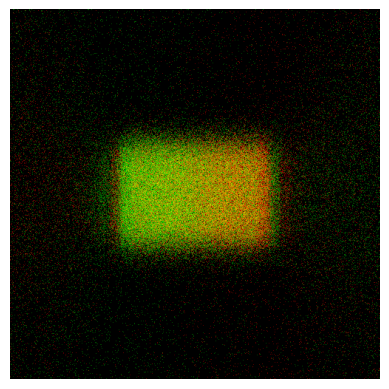
Preview simulation result
[26]:
# Method available only on Windows OS or with Speos 2026 R1.2 or higher,
# which supports opening XMP results as images regardless of the OS.
if os.name == "nt" or server_version_checker.is_version_supported(2026, 1, 2):
    from ansys.speos.core.workflow.open_result import open_result_image

    open_result_image(
        simulation_feature=sim_feat,
        result_name="ASSEMBLY1.DS (0).Dom Irradiance Sensor (0).xmp",
    )
[27]:
speos.close()
[27]:
True
Download this example
Download this example as a Jupyter Notebook or as a Python script. All assets used in the examples can be downloaded as a ZIP archive.