

Download this example
Download this example as a Jupyter Notebook or as a Python script. All assets used in the examples can be downloaded as a ZIP archive.
How to open result#
This tutorial demonstrates how to open and review results using workflow method.
Prerequisites#
Perform imports#
[1]:
import os
from pathlib import Path

from ansys.speos.core import Project, Speos, launcher
from ansys.speos.core.generic.version_checker import server_version_checker
from ansys.speos.core.kernel.client import (
    default_docker_channel,
)
from ansys.speos.core.simulation import SimulationDirect
Define constants#
Constants help ensure consistency and avoid repetition throughout the example.
[2]:
HOSTNAME = "localhost"
GRPC_PORT = 50098  # Be sure the Speos GRPC Server has been started on this port.
FILE_NAME = "LG_50M_Colorimetric_short.sv5"
RESULT_NAME = "ASSEMBLY1.DS (0).Dom Irradiance Sensor (0).xmp"
USE_DOCKER = True  # Set to False if you're running this example locally as a Notebook.
USE_GPU = False
Model Setup#
Load assets#
The assets used to run this example are available in the PySpeos repository on GitHub.
Note: Make sure you have downloaded simulation assets and set
assets_data_pathto point to the assets folder.
[3]:
if USE_DOCKER:  # Running on the remote server.
    assets_data_path = Path("/app") / "assets"
else:
    assets_data_path = Path("/path/to/your/download/assets/directory")
Connect to the RPC Server#
This Python client connects to a server where the Speos engine is running as a service. In this example, the server and client are the same machine.
[4]:
if USE_DOCKER:
    speos = Speos(channel=default_docker_channel())
else:
    speos = launcher.launch_local_speos_rpc_server(port=GRPC_PORT)
/home/runner/work/pyspeos/pyspeos/.venv/lib/python3.14/site-packages/ansys/tools/common/cyberchannel.py:201: UserWarning: Starting gRPC client without TLS on localhost:50098. This is INSECURE. Consider using a secure connection.
  warn(f"Starting gRPC client without TLS on {target}. This is INSECURE. Consider using a secure connection.")
Create project from a Speos file#
The Project class is instantiated by passing a Speos instance and the name of the Speos project file.
[5]:
p = Project(
    speos=speos,
    path=str(assets_data_path / FILE_NAME / FILE_NAME),
)
print(p)
{
"name": "LG_50M_Colorimetric_short",
"description": "From Speos file: /app/assets/LG_50M_Colorimetric_short.sv5/LG_50M_Colorimetric_short.sv5",
"part_guid": "d13dc8e0-ab97-4ce8-acdc-f34eddece276",
"sources": [
{
"name": "Dom Source 2 (0) in SOURCE2",
"metadata": {
"UniqueId": "fc6d098a-c9ac-49d4-97bc-ce87d49e1064"
},
"source_guid": "b6d795b8-b17f-430b-b514-48c39bf54592",
"display_name": "",
"description": "",
"source": {
"name": "Dom Source 2 (0) in SOURCE2",
"surface": {
"radiant_flux": {
"radiant_value": 6.590041607465698
},
"intensity_guid": "c4a54443-be9f-4d8c-872c-294211174dc0",
"exitance_constant": {
"geo_paths": [
{
"geo_path": "Solid Body in SOURCE2:2920204960/Face in SOURCE2:222",
"reverse_normal": false
}
]
},
"spectrum_guid": "f9baa3f5-b231-4b29-a9db-c10b38012da9",
"intensity": {
"cos": {
"N": 1.0,
"total_angle": 180.0
},
"name": "",
"description": "",
"metadata": {}
},
"spectrum": {
"library": {
"file_uri": "/app/assets/LG_50M_Colorimetric_short.sv5/Red Spectrum.spectrum"
},
"name": "",
"description": "",
"metadata": {}
}
},
"description": "",
"metadata": {}
}
},
{
"name": "Surface Source (0) in SOURCE1",
"metadata": {
"UniqueId": "3678c1a3-3cfa-44c1-b3e9-f7eacc95bec0"
},
"source_guid": "b3dcdb16-0305-4958-8489-03b1aa4a0a22",
"display_name": "",
"description": "",
"source": {
"name": "Surface Source (0) in SOURCE1",
"surface": {
"radiant_flux": {
"radiant_value": 9.290411220389682
},
"intensity_guid": "80f072c9-794e-4026-8e1b-7a07157891c4",
"exitance_constant": {
"geo_paths": [
{
"geo_path": "Solid Body in SOURCE1:2494956811/Face in SOURCE1:187",
"reverse_normal": false
}
]
},
"spectrum_guid": "45a8616d-916b-4d65-a04d-19fb8303ff9d",
"intensity": {
"cos": {
"N": 1.0,
"total_angle": 180.0
},
"name": "",
"description": "",
"metadata": {}
},
"spectrum": {
"library": {
"file_uri": "/app/assets/LG_50M_Colorimetric_short.sv5/Blue Spectrum.spectrum"
},
"name": "",
"description": "",
"metadata": {}
}
},
"description": "",
"metadata": {}
}
}
],
"sensors": [
{
"name": "Dom Irradiance Sensor (0)",
"metadata": {
"UniqueId": "4ae73ca8-75dc-4bc5-b1a7-ffacace372de"
},
"sensor_guid": "95359e59-5322-4d85-a3cd-1ad863e3d655",
"result_file_name": "ASSEMBLY1.DS (0).Dom Irradiance Sensor (0)",
"display_name": "",
"description": "",
"sensor": {
"irradiance_sensor_template": {
"sensor_type_colorimetric": {
"wavelengths_range": {
"w_start": 400.0,
"w_end": 700.0,
"w_sampling": 25
}
},
"illuminance_type_planar": {},
"dimensions": {
"x_start": -20.0,
"x_end": 20.0,
"x_sampling": 500,
"y_start": -20.0,
"y_end": 20.0,
"y_sampling": 500
},
"axis_system": [
-42.0,
2.0,
5.0,
0.0,
1.0,
0.0,
0.0,
0.0,
-1.0,
-1.0,
0.0,
0.0
],
"layer_type_source": {},
"integration_direction": [
1.0,
-0.0,
-0.0
],
"ray_file_type": "RayFileNone"
},
"name": "Dom Irradiance Sensor (0)",
"description": "",
"metadata": {}
}
}
],
"simulations": [
{
"name": "ASSEMBLY1.DS (0)",
"metadata": {
"UniqueId": "64b07c52-45d5-4a61-a83d-ab4fe5b2fcdd"
},
"simulation_guid": "15f14baf-60cf-4987-b207-4ad89c8281fd",
"sensor_paths": [
"Dom Irradiance Sensor (0)"
],
"source_paths": [
"Dom Source 2 (0) in SOURCE2",
"Surface Source (0) in SOURCE1"
],
"geometries": {
"geo_paths": []
},
"display_name": "",
"description": "",
"source_groups": [],
"simulation": {
"direct_mc_simulation_template": {
"geom_distance_tolerance": 0.05,
"max_impact": 100,
"weight": {
"minimum_energy_percentage": 0.005
},
"dispersion": true,
"colorimetric_standard": "CIE_1931",
"fast_transmission_gathering": false,
"ambient_material_uri": ""
},
"name": "ASSEMBLY1.DS (0)",
"metadata": {},
"description": "",
"scene_guid": "a1222a57-b6f5-4a13-8def-81d1ceaba101",
"simulation_path": "ASSEMBLY1.DS (0)",
"job_type": "CPU"
}
}
],
"materials": [
{
"name": "Material.1",
"metadata": {
"UniqueId": "a81cc0a3-26b7-4fc7-a1f1-9388c1664bb5"
},
"geometries": {
"geo_paths": [
"Solid Body in GUIDE:1379760262/Face in GUIDE:169"
]
},
"sop_guid": "d4c64261-4081-4c75-bfed-87d30adb279a",
"display_name": "",
"description": "",
"sop_guids": [],
"sop": {
"mirror": {
"reflectance": 100.0
},
"name": "",
"description": "",
"metadata": {}
}
},
{
"name": "Material.2",
"metadata": {
"UniqueId": "24d52627-d1db-4222-9ce6-9880f8026387"
},
"vop_guid": "88c6f9ed-3a40-4d60-83ce-0168d0faddcc",
"geometries": {
"geo_paths": [
"Solid Body in SOURCE2:2920204960",
"Solid Body in SOURCE1:2494956811"
]
},
"sop_guid": "d4c64261-4081-4c75-bfed-87d30adb279a",
"display_name": "",
"description": "",
"sop_guids": [],
"vop": {
"opaque": {},
"name": "",
"description": "",
"metadata": {}
},
"sop": {
"mirror": {
"reflectance": 100.0
},
"name": "",
"description": "",
"metadata": {}
}
},
{
"name": "Material.3",
"metadata": {
"UniqueId": "d509d2dc-f20c-415e-b79c-357952c2f50d"
},
"vop_guid": "2f2a6fbf-2d65-4288-8677-e088723989f1",
"geometries": {
"geo_paths": [
"Solid Body in GUIDE:1379760262"
]
},
"sop_guid": "d095488b-616b-4ada-9460-0d7ba2d270a6",
"display_name": "",
"description": "",
"sop_guids": [],
"vop": {
"optic": {
"index": 1.4,
"constringence": 60.0,
"absorption": 0.0
},
"name": "",
"description": "",
"metadata": {}
},
"sop": {
"optical_polished": {},
"name": "",
"description": "",
"metadata": {}
}
},
{
"name": "Material.4",
"metadata": {
"UniqueId": "4410151e-9d45-43f2-8ea0-47c664d1f7c8"
},
"vop_guid": "c7b4a7bd-085e-4baa-9685-9cef8566157e",
"display_name": "",
"description": "",
"sop_guids": [],
"vop": {
"optic": {
"index": 1.0,
"absorption": 0.0
},
"name": "",
"description": "",
"metadata": {}
}
}
],
"metadata": {},
"sub_scene_anchor_axis_system": [],
"scenes": []
}
Retrieve the simulation feature#
Use the method Project.find() to retrieve an instance of the SimulationDirect feature.
[6]:
sim = p.find(name=".*", name_regex=True, feature_type=SimulationDirect)[0]
Run simulation#
The simulation can be run using either the CPU or with GPU acceleration. The following cell shows how Python is used to assign the appropriate method to run_sim.
[7]:
run_sim = sim.compute_GPU if USE_GPU else sim.compute_CPU
results = run_sim()  # run the simulation
print(results)
[upload_response {
  info {
    uri: "09717779-c69b-4ac2-96aa-ed2e1815defe"
    file_name: "ASSEMBLY1.DS (0).Dom Irradiance Sensor (0).xmp"
    file_size: 1802358
  }
}
, upload_response {
  info {
    uri: "55fabdf8-4d19-4a20-9901-2a988e940c1e"
    file_name: "ASSEMBLY1.DS (0).html"
    file_size: 250872
  }
}
]
Postprocessing#
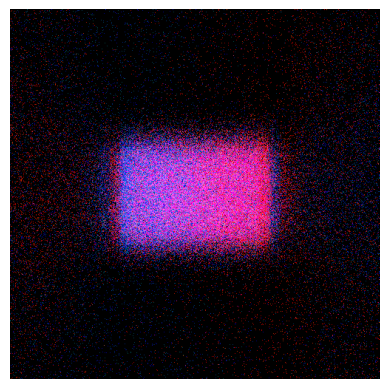
Open the results:#
Display one result as image.
A full path can be given, or the name of the result.
[8]:
# Method available only on Windows OS or with Speos 2026 R1.2 or higher,
# which supports opening XMP results as images regardless of the OS.
if os.name == "nt" or server_version_checker.is_version_supported(2026, 1, 2):
    from ansys.speos.core.workflow.open_result import open_result_image

    open_result_image(simulation_feature=sim, result_name=RESULT_NAME)
Display the image#
Display one result in a result viewer.
A full path can be given, or the name of the result.
[9]:
if os.name == "nt":
    from ansys.speos.core.workflow.open_result import open_result_in_viewer

    open_result_in_viewer(
        simulation_feature=sim,
        result_name=RESULT_NAME,
    )
Export the XMP result to PNG image#
Export one result to a PNG image file.
A full path can be given, or the name of the result.
[10]:
from ansys.speos.core.workflow.open_result import export_xmp_to_image
[11]:
exported_image = export_xmp_to_image(simulation_feature=sim, result_name=RESULT_NAME)
if exported_image.HasField("path"):
    print(exported_image.path)  # Local path of the exported image on the server.
elif exported_image.HasField("upload_response"):
    print(
        exported_image.upload_response.info.uri
    )  # URI of the exported image on the server, which can be used to download the file.
7c650bd4-3fe0-4d7b-98b5-6e132543a07a
[12]:
speos.close()
[12]:
True
Download this example
Download this example as a Jupyter Notebook or as a Python script. All assets used in the examples can be downloaded as a ZIP archive.